Can any of the PiKVM devices be operated in a visually stealth mode? I mean, with all external lights (LEDs, screen) turned off? Preferably done programmatically, as opposed to opening it up and taking to wire cutters.
No, some of the LEDs is electrically connected to power lines and status lines of plugs.
It can’t be disabled but nice small piece of black electric tape will help.
Besides - cutting board traces may lead you later into diagnostic problems and you will lose your device warranty.
Okay, LEDs can not be disabled but can be covered up. I can live with that. What about the screen? Can it be turned off?
BTW, what’s the warranty and what does it cover?
Shortly: 1 year warranty cover hardware issues (except damage made by customer).
Other warranty related things up to PiShop ToS.
That guide tells how to turn the screen on, I want the opposite. I’ve run
[root@pikvm ~]# systemctl stop --now kvmd-oled kvmd-oled-reboot kvmd-oled-shutdown
[root@pikvm ~]# systemctl disable --now kvmd-oled kvmd-oled-reboot kvmd-oled-shutdown
Removed '/etc/systemd/system/multi-user.target.wants/kvmd-oled.service'.
Removed '/etc/systemd/system/reboot.target.wants/kvmd-oled-reboot.service'.
Removed '/etc/systemd/system/shutdown.target.wants/kvmd-oled-shutdown.service'.
without any visible effect on the screen. It is still on and shining brightly.
If you reboot the device after disabling the screen services does it stay off? You’ll probably need to ping to check when it comes back up as you won’t see the IP on the screen if it works properly.
I’ve stopped kvmd-oled-* – the screen is still on. Then I’ve disabled them – screen still on. Then I’ve rebooted the device – the bloody thing is still on! Any other suggestions?
The screen is on, but is the display blank? I believe the instructions from the FAQ are just to prevent information leakage, they aren’t to actually disable power to the OLED.
The only surefire way to “hide” the screen backlight is probably to unplug the screen inside the case or cover it with electrical tape like the other LEDs. There might be a way to disable the screen using the i2c options, not sure if the below applies only to the v3 or also the v4, but you can give a try switching it to off or commenting it out in the /boot/config.txt.
# I2C (display) dtparam=i2c_arm=on
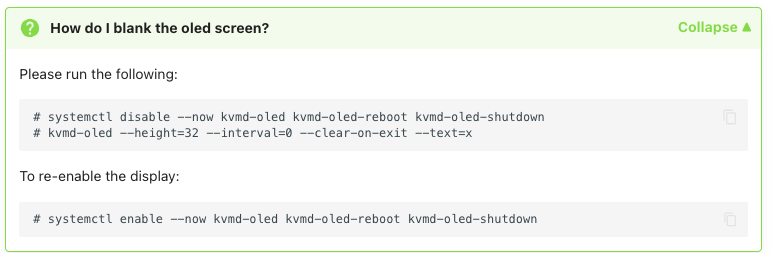
No, screen is on and still displaying whatever it was displaying.
Whatever woodoo that is, it worked! The –height parameter is not actually necessary, but the rest did black the display, and as far as I can tell turned off the backlight.
Thank you!
OLED display has own memory and after disabling service it’s just keeping last picture. OLED connected over I2C bus and no more wires except power. Software system reboot didn’t disturb OLED power (at least it has enough time to keep data in OLED RAM), so only manual power disconnection or display blanking will help.
That explains the woodoo. Thank you!